Never miss a permission slip or school event again
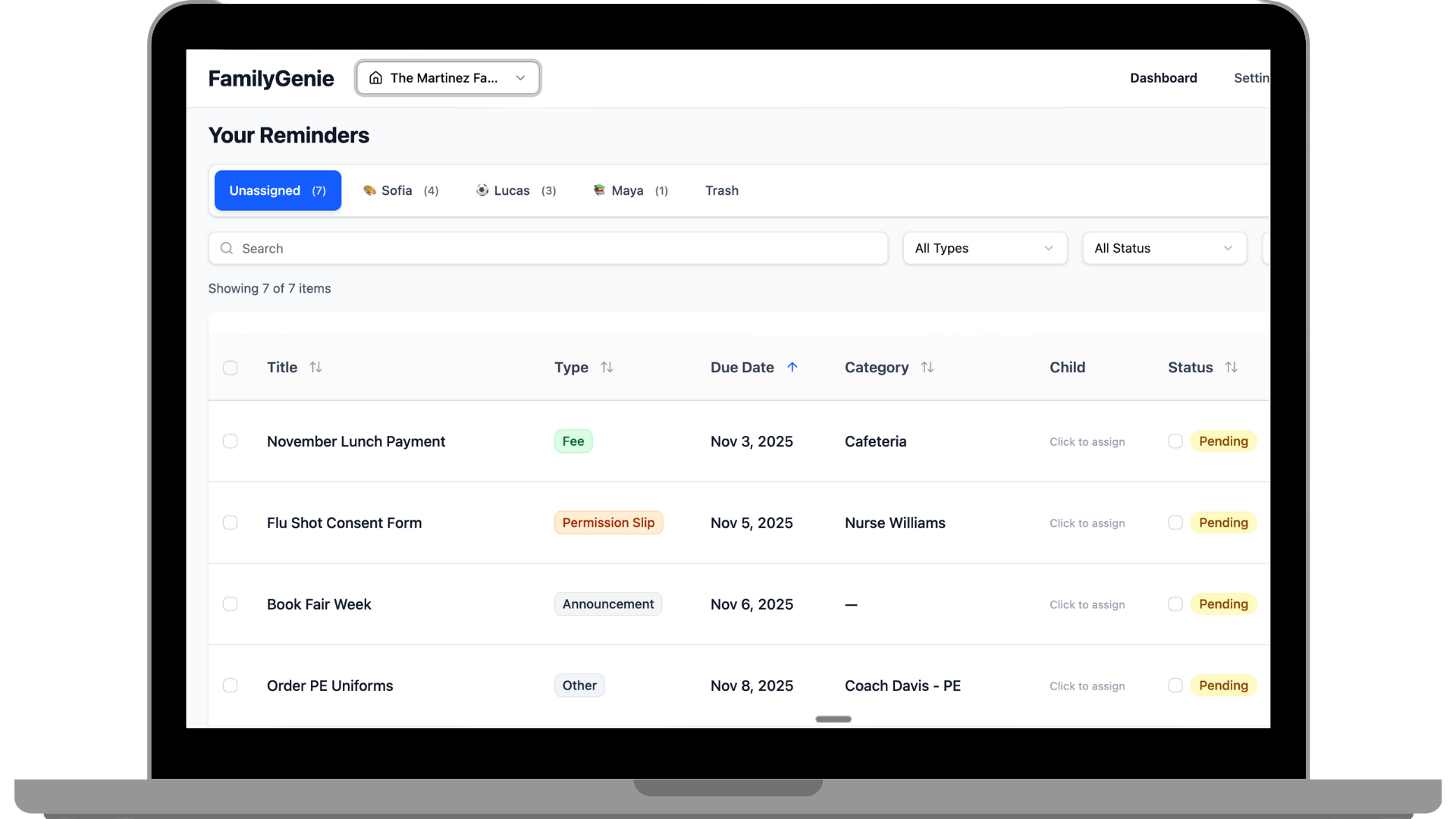
Stop drowning in ClassDojo, Remind, ParentSquare, GroupMe, and endless school emails. Forward emails, screenshot text messages, snap photos of paper forms, or upload files directly from web or mobile. FamilyGenie's AI reads everything and organizes it into one simple dashboard. No more checking 10 different apps.
Does this sound familiar?
"My kids are in a ton of sports. There's a separate app for each team. Teachers communicate via different apps at different schools, Remind and ClassDojo. We use GroupMe for one scout troop and Facebook for another. We have a church app. I just got 15 messages about what food parents are bringing. The chaos of it all is like a barrage of noise every single day."
You're not alone. Thousands of parents are juggling 7-15 different apps, checking multiple email accounts, and still missing permission slips and deadlines.
FamilyGenie fixes this.
How it works
Get organized in three simple steps. No app downloads, no complicated setup.
Send Anything
Get your unique FamilyGenie email address. Then forward emails, screenshot messages from any app, snap photos of paper forms, or upload files directly from web or mobile.
💡 Pro tip: You can forward multiple screenshots in one email
AI Reads Everything
Our AI uses advanced text recognition to read every message, screenshot, photo, and attachment—extracting dates, deadlines, action items, and important details automatically.
If it has text, we can read it.
View Your Organized Dashboard
Access your dashboard with everything categorized and sorted by priority and due date.
- Filter by child
- Search by keyword
- View upcoming deadlines
- See what needs action today
Everything in one place. No more checking 10 different apps.
Everything you need to stay organized
Powerful features designed specifically for busy parents juggling multiple kids' schedules and communications.
Forward & Forget
Forward emails, screenshot messages, snap photos of paper forms, or upload files directly. Send anything to your unique FamilyGenie address or upload from web/mobile and AI automatically extracts dates, events, and action items.
Attachment Intelligence
Our text recognition technology reads text from any image or document. Email PDFs, screenshot notifications, photos of paper forms, or handwritten notes—just forward it and we'll extract the important information.
Smart Categorization
Homework, events, fees, permission slips, and announcements are automatically sorted into the right categories.
Never Miss a Deadline
All due dates and important information are extracted and organized so you stay on top of everything.
Universal Inbox
Stop checking 7-15 different apps every day. One dashboard for school emails, sports team messages, scout troop updates, church events, tutoring schedules, and everything else.
Mobile-Friendly
Access your organized dashboard from anywhere. Perfect for busy parents on the go.
Email & Text Messages
Forward emails from teachers and coaches, or screenshot text messages from coordinators.
School Apps
Screenshot notifications from ClassDojo, ParentSquare, Remind, or any other school communication app.
Social Media & Group Chats
Screenshot Facebook group posts, GroupMe messages, or WhatsApp chats and forward them in.
Paper Forms & Flyers
Snap a photo of permission slips, flyers, or handwritten notes. Even crumpled papers from the bottom of backpacks.
Sports & Activities
Track team schedules, practice changes, and tournament details all in one place.
Community Updates
Stay on top of scout meetings, church events, tutoring schedules, and neighborhood activities.
How FamilyGenie Compares
Parents juggle multiple apps for school and family. Here's how FamilyGenie stacks up.
| Feature |  FamilyGenie FamilyGenie | ParentSquare | ClassDojo | Remind | Seesaw | Canvas | Google Classroom | GroupMe |
|---|---|---|---|---|---|---|---|---|
| Forward emails to auto-extract info | ||||||||
| Screenshot text messages | ||||||||
| Screenshot app notifications | ||||||||
| Take photo of paper forms | ||||||||
| AI extracts dates, deadlines, amounts | 1 | 2 | 2 | 2 | 2 | 3 | 3 | |
| Manual entry | ||||||||
| Smart auto-categorization (homework, events, fees, etc.) | 6 | 5 | 5 | 5 | 5 | 3 | 3 | |
| See all deadlines in one place | 2 | 2 | 2 | 2 | 3 | 3 | ||
| Multiple kids, different schools | 7 | 7 | 7 | 7 | 7 | 7 | ||
| Mobile app | 4 | |||||||
| Web app | ||||||||
| Requires school to adopt |
FamilyGenie
RecommendedParentSquare
ClassDojo
Remind
Seesaw
Canvas
Google Classroom
GroupMe
The Bottom Line
These tools all solve different problems. School apps are great for what they do, but they don't talk to each other. Calendar apps help you organize, but you have to manually copy everything over. FamilyGenie is the missing piece that brings it all together. Use it alongside your existing tools to finally see everything in one place.
Bringing peace of mind to modern parenting
FamilyGenie helps you reclaim your time, reduce mental clutter, and keep your family's world in sync.
"I swear keeping track of everyone's schedule is starting to feel like a full-time job. I juggle between school events, after-school clubs, sports, appointments and our own work stuff like nonstop."
"My kids are in a ton of sports. There's a separate app for each team. Teachers communicate via different apps at different schools, Remind and ClassDojo. We use GroupMe for one scout troop and FB for another. The chaos of it all is like a barrage of noise every single day."
"With everything scattered, I end up missing my own stuff. Our system is a fridge whiteboard + a google calendar only I open + random texts."
Frequently asked questions
Have questions? We've got answers.
Ready to stop feeling like a full-time scheduler?
Join FamilyGenie's beta today and reclaim your time and sanity.
P.S. Life with kids moves fast. FamilyGenie keeps everything in one place so you can focus on what matters most.